Welcome to your easy-to-follow guide for setting up and maintaining your Levoit Vital 100. This manual covers setup, replacement filters, resetting the filter light, and troubleshooting tips to help you get the best performance from your purifier.
Download Levoit Vital 100 Air Purifier User Manual

| Brand | Levoit |
| Model | Vital 100 Air Purifier |
| Category |
Air Purifier |
| File Size | 838 KB |
| Pages | 18 Pages |
| Language | English |
| 647 views | |
Introduction
The Levoit Vital 100 Air Purifier is designed to improve your indoor air quality by capturing dust, allergens, smoke, and pet dander. With its compact size and powerful filtration, it’s perfect for bedrooms, living rooms, and offices. This manual will guide you through the essential steps to get started and keep your air purifier running smoothly.
Safety Instructions
- Only use the purifier indoors and on a stable surface.
- Do not use near water or in excessively humid environments.
- Unplug before cleaning or replacing the filter.
- Keep away from heat sources and direct sunlight.
- Do not insert objects into the air intake or outlet.
Setup Guide
- Unbox: Remove the unit and accessories from the packaging.
- Filter Preparation: Open the back panel, remove the filter from its plastic bag, and reinstall it into the purifier.
- Placement: Place the purifier at least 15 inches from walls or furniture to allow proper airflow.
- Power On: Plug into a standard US outlet (120V) and press the power button to turn on.
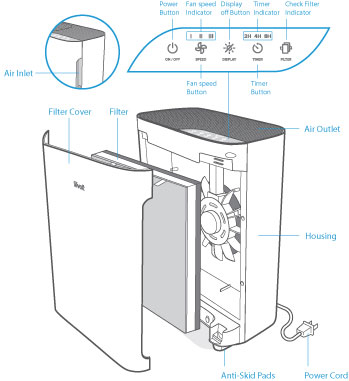
Control Panel Overview
- Power Button: Turns the unit on/off.
- Fan Speed: Cycle through low, medium, and high speeds.
- Timer: Set the purifier to run for 2, 4, or 8 hours.
- Filter Indicator: Lights up when it’s time to replace the filter.
Filter Maintenance
The Vital 100 uses a 3-stage filtration system: Pre-filter, True HEPA filter, and Activated Carbon filter. To keep your unit performing at its best:
- Vacuum the pre-filter every 2–4 weeks to remove dust and hair.
- Replace the True HEPA & Activated Carbon filter every 6–8 months, depending on usage and air quality.
- Use only official Levoit Vital 100 replacement filters for guaranteed performance.
How to Reset the Filter Light
- After replacing the filter, plug in and turn on the air purifier.
- Press and hold the Filter Reset Button for 3 seconds.
- The red filter indicator light will turn off, confirming the reset.
Troubleshooting
- Purifier won’t turn on: Ensure it’s properly plugged in and the outlet works.
- Weak airflow: Check if the filter is clogged or needs replacement.
- Unusual odor: Replace the activated carbon filter if smells persist.
- Filter light stays on: Make sure you held the reset button long enough after installing a new filter.
Frequently Asked Questions
How often should I replace the filter?
We recommend replacing the filter every 6–8 months, depending on usage and air quality.
Can I wash the HEPA filter?
No. The True HEPA and Activated Carbon filters are not washable. Only the pre-filter can be vacuumed.
What size room is the Vital 100 best for?
The Levoit Vital 100 is ideal for medium-sized rooms, such as bedrooms, living rooms, or offices.
How do I reset the filter light?
After installing a new filter, hold the filter reset button for 3 seconds until the indicator light turns off.
Customer Support & Warranty
Your Levoit Vital 100 comes with a 1-year warranty, extendable to 2 years when you register online. For support, replacement filters, or warranty claims, visit Levoit Support or contact customer service directly.