Welcome to your complete guide for the Levoit Vital 200S LAP-V201S-WUS LAP-V201S-KUS. This manual covers setup instructions, smart controls, filter replacement, how to reset the filter light, and troubleshooting to help you keep your home fresh and clean.
Introduction
The Levoit Vital 200S Smart Air Purifier is designed for medium-to-large rooms and combines high-efficiency filtration with app and voice assistant connectivity. Whether you’re tackling allergies, pet dander, smoke, or just want cleaner air, this purifier is built to make life easier. Let’s walk through how to set it up and maintain it properly.
Download Levoit Vital 200S-P Air Purifier Manual

| Brand | Levoit |
| Model | Vital 200 S |
| Category |
Air Purifier |
| File Size | 1.5 MB |
| Pages | 27 Pages |
| Language | English |
| 1856 views | |
Safety Instructions
- Use indoors only, on a dry and stable surface.
- Unplug before cleaning or replacing filters.
- Keep the air inlet and outlet free of obstructions.
- Do not use with extension cords or power strips.
- Keep away from water and direct sunlight.
Setup Guide
- Unbox: Remove the purifier and accessories from the packaging.
- Prepare the Filter: Open the back panel, remove the filter’s plastic bag, and reinsert it properly.
- Placement: Place at least 15 inches away from walls or furniture.
- Power On: Plug into a 120V outlet and press the power button to turn it on.
Smart Controls & App Setup
The Vital 200S connects to the VeSync app for full control. You can also pair it with Amazon Alexa and Google Assistant for voice commands.
- Download the VeSync app from the App Store or Google Play.
- Create or log into your account.
- Tap “+” to add a new device and select “Vital 200S.”
- Ensure your phone is connected to a 2.4GHz Wi-Fi network.
- Follow the in-app instructions to complete setup.
Control Panel Overview

- Power: Turns the unit on/off.
- Fan Speed: Adjust between low, medium, high, or auto mode.
- Timer: Set runtime from 1 to 12 hours.
- Sleep Mode: Dims lights and lowers noise for nighttime use.
- Filter Indicator: Lights up when it’s time to replace the filter.
- Wi-Fi Button: Connects the purifier to the VeSync app.
Filter Maintenance
The Vital 200S uses a 3-stage filtration system: Pre-filter, True HEPA, and Activated Carbon.
- Vacuum the pre-filter every 2–4 weeks.
- Replace the main filter every 6–8 months depending on usage.
- Only use genuine Levoit Vital 200S replacement filters for best results.
Cleaning the Dust Sensor
The Vital 200S uses a built-in dust sensor to detect particles and adjust performance in Auto Mode. Over time, dust may accumulate inside the sensor, affecting accuracy. Follow these steps to clean it:
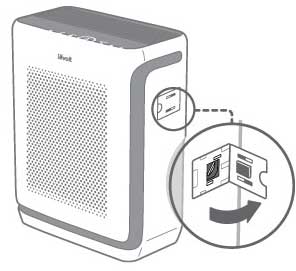
- Turn off and unplug the purifier.
- Locate the dust sensor cover on the side of the unit.
- Open the cover gently.
- Use a dry cotton swab or a soft brush to remove dust from the sensor window.
- If necessary, lightly dampen a cotton swab with clean water to wipe the sensor, then dry with a dry swab.
- Close the sensor cover securely before turning the purifier back on.
Tip: Clean the dust sensor every 2 months for optimal Auto Mode performance, or more frequently if you live in a dusty environment.
How to Reset the Filter Light
- After replacing the filter, turn the purifier on.
- Press and hold the Filter Reset Button for 3 seconds.
- The red filter indicator will turn off, confirming the reset.
Troubleshooting
- Wi-Fi won’t connect: Make sure you’re using a 2.4GHz network and the app is updated.
- Weak airflow: Check for a clogged filter or blocked air intake.
- Purifier won’t start: Ensure the filter is installed correctly and the power cord is secure.
- Filter light won’t reset: Hold the reset button until the light turns off.
Frequently Asked Questions
How often should I replace the filter?
Replace the filter every 6–8 months, depending on usage and air quality.
Does the Vital 200S work with voice assistants?
Yes, it works with Amazon Alexa and Google Assistant through the VeSync app.
Can I wash the HEPA filter?
No. The HEPA and Activated Carbon filters are not washable. Only the pre-filter can be cleaned with a vacuum.
How do I reset the filter light?
Hold the filter reset button for 3 seconds after installing a new filter until the red light turns off.
How often should I clean the dust sensor?
Clean the dust sensor every 2 months, or more often if your environment is dusty.
Customer Support & Warranty
The Levoit Vital 200S includes a 1-year warranty, extendable to 2 years when registered online. For product support, warranty claims, or replacement filters, visit Levoit Support.