A simple guide to setting up, maintaining, and troubleshooting your EverestAir Smart true HEPA purifier model LAP-EL551S-AUS, LAP-EL551S-AUSR, LAP-EL551S-WUSB
Introduction
The Levoit EverestAir Smart Air Purifier is built for large rooms and advanced air quality control. This manual helps you with first-time setup, filter replacement, resetting the filter indicator, and basic troubleshooting so you can enjoy fresh air without hassle.
Download Levoit EverestAir Smart Air Purifier User Manual
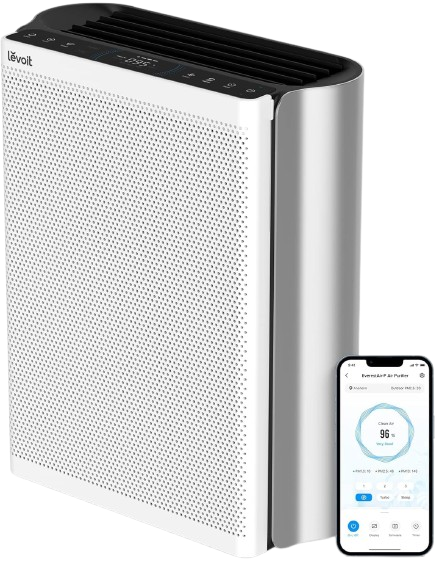
| Brand | Levoit |
| Model | EverestAir Air Purifier |
| Category |
Air Purifier |
| File Size | 2.5 MB |
| Pages | 28 Pages |
| Language | English |
| 336 views | |
Safety Information
To reduce the risk of fire, electric shock, or other injury, follow all instructions and safety guidelines.
- Use only indoors, on a flat and stable surface.
- Do not use near water, heat sources, or flammable materials.
- Always unplug before cleaning or replacing the filter.
- Keep the purifier out of reach of children and pets.
Setup Guide
To set up your EverestAir for the first time:
- Unbox the purifier and remove all protective packaging.
- Open the filter compartment and remove the filter’s plastic wrapping.
.jpg)
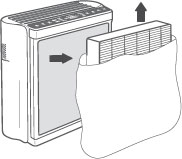
- Reinstall the filter securely and close the compartment.
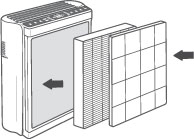
- Plug in the unit and press the power button.
- Choose between fan speeds or activate Auto Mode for smart adjustments.
Tip: Place the purifier at least 15–20 inches away from walls for optimal airflow.
Filter Replacement
The EverestAir uses a high-performance multi-stage filter. To keep your air fresh:
- Replace the filter every 6–12 months, depending on usage and local air quality.
- Use only genuine Levoit replacement filters for guaranteed fit and performance.
- Purchase filters from the official store or authorized retailers.
Steps to replace the filter:
- Turn off and unplug the purifier.
- Open the filter compartment.
- Remove the old filter and dispose of it.
- Insert the new filter and close the cover securely.
- Plug in the unit and turn it on.
- Reset the filter light (see next section).
How to Reset Filter Light
After replacing the filter, the filter light needs to be reset:
- Power on the purifier.
- Press and hold the Filter Reset button for 3 seconds.
- The indicator light will turn off and the counter resets.
Note: If the light doesn’t turn off, repeat the process while the unit is powered on.
Smart App & Voice Control
The EverestAir connects to the VeSync app for smart control and monitoring:
- Download the VeSync app from the App Store or Google Play.
- Sign in or create a free account.
- Connect the purifier to a 2.4 GHz Wi-Fi network.
- Follow in-app prompts to add your device.
- Enable Amazon Alexa or Google Assistant for voice commands.
The app allows you to adjust fan speed, set schedules, monitor filter life, and view real-time air quality data.
Troubleshooting
- Purifier won’t turn on: Confirm power cord is connected and outlet is working.
- Weak airflow: Ensure packaging is removed from the filter and the intake is not blocked.
- Strange odor: Replace the filter if it’s been used for over 12 months.
- Wi-Fi won’t connect: Make sure you’re on 2.4 GHz Wi-Fi and bring the purifier closer to your router.
- Filter indicator won’t reset: Hold the reset button for at least 3 seconds while the purifier is on.
Care & Maintenance
- Vacuum the pre-filter every 2–4 weeks to remove dust and pet hair.
- Clean the outer housing with a soft, dry cloth.
- Do not wash or soak the filter in water.
- Store indoors in a cool, dry place if not used for long periods.
Frequently Asked Questions
How do I reset the filter light on the Levoit EverestAir?
Hold the Filter Reset button for 3 seconds while the purifier is on. The indicator will turn off once reset.
How often should I replace the filter?
Replace every 6–12 months depending on usage and environment. The filter indicator will remind you when it’s time.
Can I use Alexa or Google Assistant with the EverestAir?
Yes. Once connected in the VeSync app, you can control your purifier hands-free with Amazon Alexa or Google Assistant.
Why won’t my EverestAir connect to Wi-Fi?
The EverestAir supports 2.4 GHz Wi-Fi only. Make sure your phone is on the same network and keep the purifier close to the router during setup.
Warranty & Support
Your Levoit EverestAir Smart Air Purifier comes with a limited warranty. For details and customer assistance:
- Visit the Levoit Support Page
- Check your warranty card for contact information
- Order genuine filters and parts from the official store