Your step-by-step guide to setup, filter replacement, and troubleshooting your Core 400S.
Introduction
The Levoit Core 400S Smart Air Purifier delivers powerful purification with smart controls. This user manual covers setup, filter replacement, resetting the filter light, and troubleshooting tips to help you get the most out of your purifier.
Download Levoit Core 400S Smart Air Purifier Manual

| Brand | Levoit |
| Model | Core 400S Smart Air Purifier |
| Category |
Air Purifier |
| File Size | 5.1 Mb |
| Pages | 24 Pages |
| Language | English |
| 801 views | |
Safety Information
- Use indoors only and keep on a level, stable surface.
- Do not use near open flames, heat sources, or wet areas.
- Unplug before cleaning or replacing the filter.
- Keep away from small children and pets to prevent accidents.
Setup Guide
Follow these steps to set up your Core 400S:
- Unbox the purifier and remove all packaging materials
- Flip the air purifier over or turn it on its side. Twist the filter cover counterclockwise and remove it.

- Remove the filter from its plastic packaging and place the filter back into the air purifier.

- Insert the filter securely and reattach the back cover.
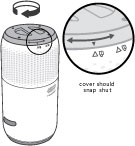
- Plug in the purifier and press the power button to turn it on.
- Select fan speed or auto mode using the touch controls.
Tip: Place the purifier at least 15–20 inches away from walls or furniture for better airflow.
Filter Replacement
The Core 400S uses a 3-stage filter system (pre-filter, True HEPA, and activated carbon). For clean air:
- Replace the filter every 6–12 months, depending on usage and environment.
- Use only genuine Levoit replacement filters for optimal performance.
- Find replacement filters in the official store or authorized retailers.
To replace the filter:
- Turn off and unplug the purifier.
- Remove the back cover.
- Take out the old filter and dispose of it.
- Insert the new filter into the compartment.
- Secure the back cover and plug the purifier back in.
- Reset the filter indicator (see below).
How to Reset Filter Light
After installing a new filter, the filter indicator will stay on until it’s reset. Here’s how to reset it:
- Turn on the purifier.
- Press and hold the Filter Reset button for 3 seconds.
- The filter indicator light will turn off, and the cycle resets.
Note: If the light doesn’t turn off, repeat the process while ensuring the purifier is powered on.
Smart App & Voice Control
The Core 400S works with the VeSync app, giving you full control from your phone:
- Download the VeSync app from the Apple App Store or Google Play.
- Log in or create a VeSync account.
- Connect your purifier to a 2.4 GHz Wi-Fi network.
- Add your device in the app and follow the on-screen steps.
- Enable voice control with Amazon Alexa or Google Assistant.
With the app, you can set schedules, check air quality, and monitor filter life remotely.
Troubleshooting
- Purifier not turning on: Confirm the power cord is plugged in and outlet works.
- Low airflow: Ensure filter packaging is removed and check for obstructions.
- Strange odors: Replace the filter if used for more than 12 months.
- Wi-Fi issues: Use 2.4 GHz Wi-Fi, move closer to the router, and reset if needed.
- Filter indicator won’t reset: Hold the reset button for at least 3 seconds while the unit is on.
Care & Maintenance
- Vacuum the pre-filter every 2–4 weeks to remove dust, lint, and hair.
- Wipe the housing with a soft dry or slightly damp cloth.
- Do not wash the filter with water.
- Store indoors in a dry place if not used for long periods.
Frequently Asked Questions
How do I reset the filter light on the Levoit Core 400S?
Press and hold the Filter Reset button for 3 seconds. The indicator will turn off once it’s reset.
How often should I replace the filter?
Replace the filter every 6–12 months depending on air quality and usage. The filter indicator light will remind you when it’s time.
Can I control the Core 400S with Alexa or Google Assistant?
Yes. Once set up in the VeSync app, you can control the purifier hands-free with Alexa or Google Assistant.
Why is my Core 400S not connecting to Wi-Fi?
The purifier supports only 2.4 GHz Wi-Fi. Make sure your phone is connected to the same network and place the purifier near the router during setup.
Warranty & Support
The Levoit Core 400S includes a limited warranty. For details or help:
- Visit the Levoit Support Page
- Contact customer service via the warranty card information
- Purchase genuine filters and parts from the official store