SILONN SLIM25T SLIM25B SLIM25G Countertop Bullet Ice Maker Instruction Manual describes about important safety information, detailed product parts, control panel view and usage, how to use the ice maker, cleaning and maintenance and product specifications. Before use and operates this Ice maker, you must carefully read and follow the instructions in the User manuals to understand the product deeply.
About Silonn Countertop Bullet Ice Maker Slim25T
This ice maker can make 9 bullet ice cubes in just 6 minutes and can make maximum 26 lbs of ice in 24 hours supported by 1.2L water tank that can be filled as needed.
No worries about running low of water and ice basket is full, the indicator in the ice maker will warn you and stop working until you add the water or grab the ice from the basket.
You can use self-cleaning mode to keep your ice tasting fresh. Just remove the basket, add water, then hold the Select button. Press the On/Off button to start the 5-minute process, then drain the ice machine over a sink to complete.
Instruction Manual Table of Content
- Important Safety Information
- Silonn Slim25T Slim25b Product Parts
- Silonn Slim25T Slim25b Control Panel
- How to Use Silonn Slim25T Slim25b Ice Maker
- How to Clean and maintenance Silonn Slim25T Slim25b
- Silonn Slim25T Slim25b Spesifications
- Troubleshooting Silonn Slim25T Slim25b
Important Safety Information
To reduce risk of injury or property damage, please follow these safety precautions.
- Voltage power from outlet must match specifications on appliance nameplate
- This ice maker must be grounded
- Using an extension cord may cause overheating and increase the risk of fire. Unplug the unit before cleaning by hand
- Only responsible and capable adults should operate the ice maker
- Do not operate if any component, including the cord or plug is damaged
- Do not place the power cord where it could be pulled by children or pose a tripping hazard
- Do not use water that is micro-biologically unsafe or unknown quality
- Do not remove any safety, warning, or product information labels from the unit
- Do not touch the evaporator with your hands while the ice maker is operating
- Do not plug in or unplug the unit with wet hands
- When handling, installing, and operating the unit, care should be taken to avoid damage to the refrigerant tubing
- Keep ventilation openings arround the unit's enclosure clear of obstruction
- Do not place the unit near heat sources such as an oven
- Ensure a minimum of 3 inches of clearance around the side and back walls of the unit for proper air circulation
- Do not place the unit in direct sunlight
Silonn Slim25T Slim25b Product Parts
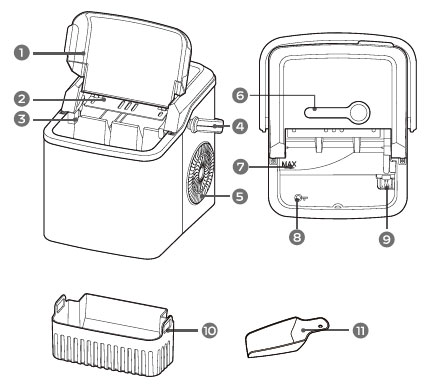
- Large viewing window
- Ice shovel
- Ice full sensor
- Handle
- Air exhaust fan
- Control panel
- Maximum water fill line
- Drain plug
- Filter
- Ice basket
- Ice scoop
Silonn Slim25T Slim25b Control Panel
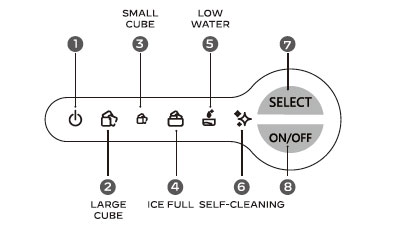
- Indicator light flashes when powering up but remains on when in working mode
- Indicator light is on when large ice cube mode is selected
- Indicator light is on when small ice cube mode is selected
- Indicator light is on when the ice basket is ready and full
- Indicator light is on when the water reservoir is low
- Indicator light is on when the isce maker is in self-cleaning mode
- Press SELECT button to switch between large ice, small ice or self-cleaning mode
- Power button to turn on/off the ice maker
How to Use Silonn Slim25T Slim25b Ice Maker
Before first use
- Stand upright for 24 hours, check for accessories if any missing parts contact customer service
- Clean the ice maker thoroughly before first use
- Discard first 4 cycles of ice making
- Use in locations 50ºF ~ 90ºF (10ºC ~ 32ºC)
- Align the handle with the keyholes
- Insert each side into the keyholes
- Lift handle back to lock in place
- Do not place the ice maker in unstable base
- Use only drinking water
- Do not use in high or low temperature
How to use Ice maker
- Open cover and remove basket
- Fill water, do not exceed the MAX water mark
- Press the ON/OFF button
- Press SELECT button to choose ice cube size
- Wait for 6 - 13 minutes depending on room temp and ice size
- Indicator light is on when ice basket is full and ready
- When water near empty, refill the water and press ON/OFF button to restart making ice
- Take ice cubes out in time to avoid melting
How to Clean and maintenance Silonn Slim25T Slim25b
To keep your ice tasting fresh and the Ice Maker looking great, you can cleaning the unit once per week.
Self-cleaning (5-min process)
- Remove the basket and add water
- Press SELECT button to choose self-cleaning mode
- Drain water reservoir
- Clean exterior with cloth and mild dishwashing soap
Manual Cleaning
Turn off the Ice maker and disconnect from power outlet before cleaning
- Remove the basket
- Clean using a soft cloth with warm water and vinegar. Clean the water filter, ice shovel and the evaporator to avoid dirt buildup
- Drain water reservoir
- Clean the exterior with cloth and mild dishwashing soap
Donot use organic solvent, boiled water, detergent, strong acid and strong alkali etc for cleaning. When the ice maker unit is not to be used for long time duration, drain the water completely and dry the interior. Store in a well ventilated area
Specification
|
Brand Name |
Silonn |
|
Model |
SLIM25T SLIM25B SLIM25G |
|
Item Weight |
13.6 lbs |
|
Product Dimensions |
11.93" x 9.8" x 11.1" |
|
Country of Origin |
China |
|
Capacity |
26 lbs in 24 hours |
|
nstallation Type |
Countertop |
|
Color |
Stainless Steel |
|
Special Features |
Portable Ice Maker, Self-Cleaning, Compact Design, Makes Two Sizes of Ice |
|
Material Type |
ABS and PP Plastic |
|
Included Components |
Ice Maker, Ice Scoop, Ice Basket, User Manual |
|
Batteries Required? |
No |
Troubleshooting Silonn Slim25T Slim25B Slim25G
Poor ice shape or quality
Posible causes:
- Poor heat dissipation, the solution is leave a 6-inch clearance area on all sides of the ice maker for ventilation
- The water temperature is too high, use the water with temperature between 46ºF and 77ºF
- The ambient temperature is too high, use the ice maker in room temperatures between 50ºF and 90ºF
- Evaporator deformation, please contact customer service
Ice maker creating loud noise
Possible causes:
- Ice maker has not been cleaned for a long time, which will form a sticky substance around the inlet of the water pump. Please clean every one to two weeks, using some neutral cleaning agents (such as mild vinegar solution and soapy water)
- Lack of water to pump will create noise when pumping water, the solution is add more water
- Fan or ice maker is damaged, please contact customer services
- Water pump i s damaged, please contact customer services
Ice full Indicator is on
Possible causes:
- Ice is blocking the infrared sensor, please empty the ice basket
- Infrared sensors not working, try to wipe the infrared sensors to clean the sensor, if still not working please contact customer service
Ice Sticks together
Possible causes:
- Making ice takes too long, please stop making ice. After the ice is melts, restart the ice maker and try to making ice again
- The water temperature is too low, fill the water with temperature between 46ºF and 77ºF
- Evaporator deformation, for this problem you can contact customer service
Cannot making Ice
If your ice maker cannot making ice, there is many possible causes that you cannot fix by your self. We recommended to contact customer services
- Ambient temperature is too high, keep ambient temperature less than 90ºF and fill with cold water
- Water pump is damaged, you can replace the water pump if you can do it your self, but we recommend to contact customer services
- Refrigerant system leaking, if you see the refrigerant system is wet, my its the system is leaking, please contact customer services
- Refrigerant system blocking, you can contact cusmtomer care
- The fan stop working, you can try to cleaning the fan and restart the unit, if not fixed, please contact customer services
- The wires inside the ice maker is loose, you need the disassembly the unit to check this, we recommend to contact customer services
- The gears in the motor are broken, the gear must be replaced with new gear, you can ask the customer services how to fix this.
Low water indicator is on
Possible cause:
- Low of water or not enough water inside the weter reservoir. Stop making ice, refill the water, then press ON/OFF button, then restart and try again
- Water screen blocked at the bottom of the water reservoir, start the self-cleaning function
- Pum and water detector malfunction, for this problem you can contact the customer services
Download Silonn Countertop Bullet Ice Maker Slim25T Instruction Manual

| Brand | Silonn |
| Model | SLIM25T SLIM25B SLIM25G |
| Category |
Ice Maker |
| File Size | 4 Mb |
| Pages | 16 Pages |
| Language | English |
| 802 views | |