Welcome to the complete NOCO Genius 2 Smart Charger user manual. This professional guide is designed to help you understand, operate, and maintain your NOCO Genius 2 with confidence. Covering everything from initial setup to advanced maintenance techniques, this document ensures you achieve maximum battery performance while maintaining the highest safety standards.
Product Overview
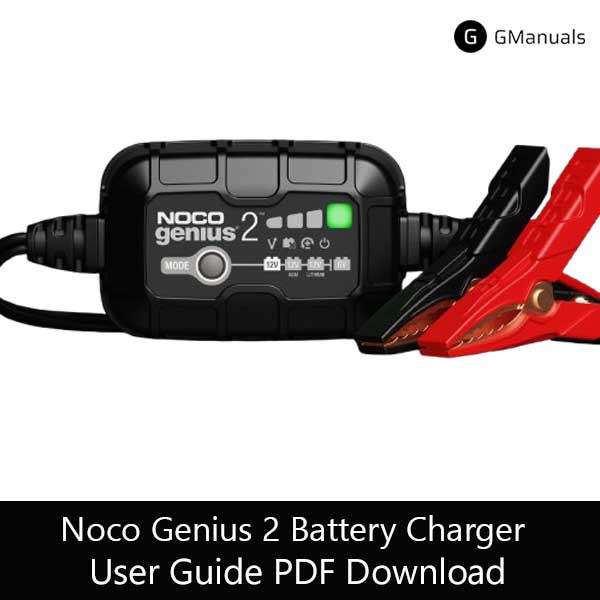
The NOCO Genius 2 is a compact, fully automatic 2-amp smart charger and maintainer engineered to deliver reliable battery care for 6V and 12V battery systems. It supports multiple battery chemistries—flooded (wet), gel, AGM, and selected lithium-ion types—providing multi-stage charging, thermal compensation, and built-in safety features to maximize battery life and restore underperforming batteries when possible.
Designed for both professional technicians and everyday vehicle owners, the Genius 2 is especially suited for motorcycles, ATVs, cars, marine batteries, lawn & garden equipment, and seasonal vehicles kept in storage. Its small form factor and straightforward operation make it ideal for garage use or as a portable maintenance tool.
Key Features
- Dual-voltage compatibility: 6V and 12V charging options.
- Multi-chemistry support: Flooded, Gel, AGM, and select Lithium chemistries.
- 2 Amp output: Controlled, efficient charging and maintenance current.
- Automatic multi-stage charging: Precision charging that protects battery longevity.
- Battery repair (desulfation): Attempt to recover deeply discharged lead-acid batteries.
- Thermal compensation: Adjusts charging parameters by ambient temperature.
- Safety protections: Spark-proof, reverse polarity protection, and short-circuit detection.
Technical Specifications
| Input Voltage | 100–240 VAC, 50–60 Hz |
|---|---|
| Output Current | 2 Amps (maximum) |
| Supported Voltages | 6V and 12V |
| Battery Types | Lead-acid (Flooded, AGM, Gel, EFB), Lithium-ion (LiFePO4 where specified) |
| Operating Temperature | -20°C to +50°C (-4°F to +122°F) |
| Dimensions | Approximately 102mm × 83mm × 33mm |
| Weight | ~0.35 kg |
Note: Always consult the battery manufacturer’s specification to confirm suitability for charging profiles and lithium compatibility.
Safety Precautions
Working with batteries involves inherent risks. Observe the following mandatory safety measures before using the Genius 2:
- Read the entire user manual and safety leaflet prior to first use.
- Ensure good ventilation and avoid charging batteries in enclosed spaces containing flammable vapors.
- Connect the charger clamps to the battery terminals before plugging into AC power.
- Confirm clamp polarity: red = positive (+), black = negative (−). If uncertain, stop and verify.
- Do not attempt to charge frozen or physically damaged batteries.
- Keep children and unauthorized personnel away from the charger during operation.
- If an error indicator appears, disconnect immediately and inspect the connections and battery condition.
Step-by-step Operating Instructions
Follow these steps for consistent, safe charging:
- Inspect the battery: Verify terminals are clean and the battery has no visible damage.
- Choose the correct voltage and chemistry: Select 6V or 12V and the appropriate mode.
- Attach clamps: Connect red clamp to the positive terminal and black clamp to the negative terminal or engine block ground.
- Apply AC power: Plug the unit into a properly grounded outlet; the unit will initialize and assess battery condition.
- Monitor indicators: The charger provides status LEDs to display charging, fault, and full-charge states.
- Completion: When the charger indicates full charge, unplug the AC power first, then remove clamps starting with the negative terminal.
Tip: For batteries stored long-term, leave the Genius 2 connected in maintenance mode to prevent discharge and sulfation.
Maintenance & Storage
To prolong service life and reliability:
- Store in a dry, temperature-controlled environment.
- Do not submerge the charger; wipe with a dry cloth when dirty.
- Inspect clamps and cable insulation periodically for wear; replace if degraded.
- Do not block ventilation openings during operation.
Troubleshooting
Common conditions and corrective actions:
- Unit does not power on
- Verify AC outlet and cord integrity. Try another outlet and check fuse/breaker.
- Fault indicator illuminated
- Check clamp polarity and battery connection; remove corrosion and reattach clamps firmly.
- Charging is exceptionally slow
- Large capacity or sulfated batteries charge slowly; consider battery repair mode or professional testing.
- Battery will not accept charge
- Battery may be irreversibly damaged—conduct a load test or consult a battery specialist.
Download Noco Genius 2 Battery Charger Manual
| Brand | Noco |
| Model | Genius 2 |
| Category |
Battery Charger |
| File Size | 370 KB |
| Pages | 32 Pages |
| Language | English, Francais, Espanol |
| 1280 views | |
Includes setup guide, LED status codes, safety, and troubleshooting
Frequently Asked Questions (FAQ)
What battery types and voltages are supported by the NOCO Genius 2?
The NOCO Genius 2 supports 6V and 12V systems and is compatible with common lead-acid chemistries (flooded, GEL, AGM, EFB). It also supports specified lithium-iron-phosphate (LiFePO4) batteries where indicated by NOCO. Always verify the battery manufacturer’s recommendations prior to charging lithium chemistries.
Can the Genius 2 repair a heavily discharged or sulfated battery?
The Genius 2 includes a battery repair/desulfation mode intended to recover certain sulfated lead-acid batteries and improve charge acceptance. Success depends on the extent of sulfation and the battery’s physical condition; severely damaged batteries may not be recoverable and should be tested or replaced.
Is it safe to keep the charger connected long-term?
Yes. The Genius 2 is designed with a maintenance/float mode that automatically reduces current to maintain a full charge without overcharging. This makes it suitable for long-term battery storage when left connected as directed.
What does the red error light indicate and how should I respond?
A red or fault indicator typically means an improper connection, reverse polarity, or a detected short. Immediately disconnect power, verify clamp polarity and terminal cleanliness, and inspect the cable for damage. If issues persist, have the battery and charger inspected by a qualified technician.
Can I use the Genius 2 outdoors?
While the Genius 2 is robust, avoid direct exposure to heavy rain or immersion. Use under sheltered conditions and ensure the device is not exposed to excessive dust, water spray, or submersion. Store indoors when not in use.
Disclaimer: This site is not affiliated with NOCO. NOCO and Genius are trademarks of The NOCO Company.