About Noco Boost HD GB70 User Guide
READ AND UNDERSTAND ALL SAFETY INFORMATION BEFORE USING THIS PRODUCT
Failure to follow these safety instructions may result in ELECTRICAL SHOCK, EXPLOSION, FIRE, which may result in a SERIOUS INJURY, DEATH, or PROPERTY DAMAGE. Electrical Shock. Product is an electrical device that can shock and cause serious injury. Do not cut power cords. Do not submerge in water or get wet.
Explosion. Unmonitored, incompatible, or damaged batteries can explode if used with product. Do not leave product unattended while in use. Do not attempt to jump start a damaged or frozen battery. Use product only with batteries of recommended voltage. Operate product in well ventilated areas.
Fire. Product is an electrical device that emits heat and is capable of causing burns. Do not cover product. Do not smoke or use any source of electrical spark or fire when operating product. Keep product away from combustible materials.
Eye Injury. Wear eye protection when operating product. Batteries can explode and cause flying debris. Battery acid can cause eye and skin irritation. In the case of contamination of eyes or skin, flush affected area with running clean water and contact poison control immediately.
Explosive Gases. Working in the vicinity of a lead-acid is dangerous. Batteries generate explosive gases during normal battery operation. To reduce risk of battery explosion, follow all safety information instructions and those published by the battery manufacturer and manufacturer of any equipment intended to be used in the vicinity of battery. Review wcautionary markings on these products and on engine.
Download Noco Boost HD GB70 User Manual PDF

| Brand | Noco |
| Model | Genius HD GB70 |
| Category |
Battery Charger |
| File Size | 152 Kb |
| Pages | 8 pages |
| Language | English |
| 1338 views | |
Important Safety Warning
Proposition 65. WARNING: This product can expose you to chemicals including lead and exhaust fumes, which are known to the State of California to cause cancer and birth defects or other reproductive harm. For more information go to www.P65Warnings.ca.gov.
Personal Precaution. Only use product as intended. Someone should be within range of your voice or close enough to come to your aid in case of emergency. Have a supply of clean water and soap nearby in the case of battery acid contamination. Wear complete eye protection and protective clothing while working near a battery. Always wash hands after handling batteries and related materials. Do not handle or wear any metal objects when working with batteries including; tools, watches or jewelry. If metal is dropped onto battery, it may spark or create a short circuit resulting in electrical shock, fire, explosion which may result in injury, death or property damage.
Minors. If the product is intended by "Purchaser" to be used by a minor, purchasing adult agrees to provide detailed instructions and warnings to any minor prior to use. Failure to do so is the sole responsibility of the "Purchaser," who agrees to indemnify NOCO for any unintended use or misuse by a minor.
Choking Hazard. Accessories may present a choking hazard to children. Do not leave children unattended with product or any accessory. The product is not a toy
Handling. Handle product with care. The product can become damaged if impacted. Do not use a damaged product, including, but not limited to, cracks to the casing or damaged cables. Do not use product with a damaged power cord. Humidity and liquids may damage product. Do not handle product or any electrical components near any liquid. Store and operate product in dry locations. Do not operate product if it becomes wet. If product is already operating and becomes wet, disconnect it from the battery and discontinue use immediately. Do not disconnect the product by pulling on the cables.
Modifications. Do not attempt to alter, modify or repair any part of the product. Disassembling product may cause injury, death or damage to property. If product becomes damaged, malfunctions or comes in contact with any liquid, discontinue use, and contact NOCO. Any modifications to the product will void your warranty.
Accessories. This product is only approved for use with NOCO accessories. NOCO is not responsible for user safety or damage when using accessories not approved by NOCO.
Location. Prevent battery acid from coming in contact with the product. Do not operate the product in a closed-in area or an area with restricted ventilation. Do not set a battery on top of product. Position cable leads to avoid accidental damage by moving vehicle parts (including hoods and doors), moving engine parts (including fan blades, belts, and pulleys), or what could become a hazard that may cause injury or death.
Operating Temperature. This product is designed to work in ambient temperatures between -20º C to 50º C. Do not operate outside of temperature ranges. Do not jump start a frozen battery. Discontinue use of product immediately if the battery becomes excessively warm.
Storage. Do not use or store your product in areas with high concentrations of dust or airborne materials. Store your product on flat; secure surfaces so it's not prone to falling. Store your product in a dry location. The storage temperature is -20ºC to +50ºC (0ºC ~ +25ºC daily average). Never exceed 80ºC under any condition
Compatibility. The product is only compatible with 12-volt lead-acid batteries only. Do not attempt to use product with any other type of battery. Jump starting other battery chemistries may result in injury, death or property damage. Contact the battery manufacturer prior to attempting to jump start the battery. Do not jump start a battery if you are unsure of the battery's specific chemistry or voltage.
The Battery. The built-in lithium-ion battery in the product should be replaced only by NOCO, and must be recycled or disposed of separately from household waste. Do not attempt to replace the battery yourself and do not handle a damaged or leaking lithium-ion battery. Never dispose of battery in household trash. Disposal of batteries in household trash is unlawful under state and federal environmental laws and regulations. Always take used batteries to your local battery recycling center. If the product battery is excessively hot, emitting an odor, deformed, cut, or is experiencing or demonstrating an abnormal occurrence, immediately stop all use and contact NOCO.
Battery Charging. Charge the product with the included USB charge cable and a NOCO 10W 12V power adapter. A third-party USB cable and 5W or 10W power adapter that are compatible with USB 2.0 or power adapters compliant with one or more of the following standards EN 301489-34, IEC 62684, YD/T 1591-2009, CNS 15285, ITUL.2000. Be cautious of using low quality power adaptors, as they may present a serious electrical risk that can result in injury to person, Device, and property. If using a third party USB power adapter, contact the manufacturer(s) to find out if your power adapter complies with the above standards. Using damaged cables or chargers, or charging when moisture is present, can result in electric shock. Using generic or third-party power adapter may shorten the life of your product and cause the product to malfunction. NOCO is not responsible for the user’s safety when using accessories or supplies that are not approved by NOCO. When using a USB Power Adapter to charge the product, make sure that the AC plug is fully inserted into the adapter before you plug it into a power outlet. Power adapters may become warm during normal use, and prolonged skin contact may cause bodily injury. Always allow adequate ventilation around power adapters when using them. To ensure maximum battery life, avoid charging your product for more than a week at a time, as overcharging may shorten battery life. Over time, an unused product will discharge and must be recharged before use. Disconnect the product from power sources when not in use. Use the product only for their intended purposes.
Medical Devices. Product may emit electromagnetic fields. Product contains magnetic components which may interfere with pacemakers, defibrillators, or other medical devises. These electromagnetic fields may interfere with pacemakers or other medical devices. Consult with your physician prior to use if you have any medical device including pacemakers. If you suspect the product is interfering with a medical device, stop using the product immediately and consult your physician.
Medical Conditions. If you have any medical condition that you believe could be affected by product, including but not limited to; seizures, blackouts, eyestrain or headaches, consult your physician prior to use of product. The use of a integrated high-powered flashlight contains a light sensitivity hazard. Use of the light in Strobe Mode may cause seizures in persons with photosensitive epilepsy, which may result in serious injury or death.
Light. Staring directly into the light beam or shine of the flashlight may result in permanent eye injury. The product is equipped with a high output LED pre-focused lamp that emits a powerful beam at the highest setting.
Cleaning. Power off the product before attempting any maintenance or cleaning. Clean and dry product immediately if it comes in contact with liquid or any type of contaminant. Use a soft, lint-free (microfiber) cloth. Avoid getting moisture in openings. Explosive Atmospheres. Obey all signs and instructions. Do not operate product in any area with a potentially explosive atmosphere, including fueling areas or areas which contain chemicals or particles such as grain, dust or metal powders.
High-Consequence Activities. This product is not intended for use where the failure of the product could lead to injury, death or severe environmental damage.
Radio Frequency Interference. Product is designed, tested, and manufactured to comply with regulations governing radio frequency emissions. Such emissions from the product can negatively affect the operation of other electronic equipment, causing them to malfunction.
Model Number: GB70 This device complies with Part 15 of the FCC Rules. Operation is subject to the following two conditions:
(1) this device may not cause harmful interference, and (2) this device must accept any interference received, including interference that may cause undesired operation.
NOTE: This equipment has been tested and found to comply with the limits for a Class A digital device, pursuant to Part 15 of the FCC Rules. These limits are designed to provide reasonable protection against harmful interference when the equipment is operated in a commercial environment. This equipment generates, uses, and can radiate radio frequency energy and, if not installed and used in accordance with the instruction manual, may cause harmful interference to radio communications. Operation of this equipment in a residential area is likely to cause harmful interference in which case the user will be required to correct the interference at his own expense.
How to Use Noco Boost HD GB70
Step 1: Charge the GB70
The GB70 comes partially charged out of the box and needs to be fully charged prior to use. Connect the GB70 using the included USB Charge Cable to the USB IN port and the USB car charger. It can also be recharged from any USB powered port, like an AC adapter, car charger, laptop and more. The USB IN port is rated at 2.1 Amps to ensure safe and efficient charging of the internal lithium battery. Due to FCC regulations, we recommend not to charge and discharge the unit at the same time. The time to recharge a GB70 will differ based on the discharge level and the power source used. Actual results may vary due to battery conditions.
| Charger Rating | 0.5 A | 1 A | 2 A |
| Recharge time | 28 hr | 14 hr | 7 hr |
| 12V Fast charging | 3A @ 12V (36W) | 2-3hr |
When recharging, the charge level of the internal battery is indicated by the Charge LEDs. The LEDs will slowly pulse 'On' and 'Off' and become solid until all four Charge LEDs are on. When the battery is fully charged, the Green 100% LED will be solid, and the 25%, 50% and 75% Charge LEDs will turn "Off". From time to time, the Green 100% LED will pulse indicating maintenance charging is occuring.
USB Charging (Up to 10W): Connect the GB70 using the included USB Charge Cable to the USB IN port and a powered USB port, like an AC adapter, car charger, laptop and more. The USB IN port is rated at 2.1 Amps to ensure safe and efficient charging of the internal lithium battery.
12V Fast Charge (36W): Connect the 12V Cable to the “12V IN” port on the GB70, and the other end to the Male 12 Plug. Plug into a powered 12V AUX Plu (Cigarette Lighter Port.)
Powering Your 12V Devices.
Connect the 12V Cable to the “12V OUT” port on the GB70, and the other end to the Female 12V Plug (12V AUX/ Cigarette Lighter Port.) Plug-in any standard 12V device (Up to 15A) with a 12V plug and turn the GB70 “On” to start powering your device.
Step 2: Connect to the Battery
Carefully read and understand the vehicle owner's manual on specific precautions and recommended methods for jump starting the vehicle. Make sure to determine the voltage and chemistry of the battery by referring to your battery owner's manual prior to using this product. The GB70 is for jump starting 12-volt lead-acid batteries only. Before connecting to the battery, verify that you have a 12-volt lead-acid battery.
The GB70 is not suitable for any other type of battery. Identify the correct polarity of the battery terminals on the battery. The positive battery terminal is typically marked by these letters or symbol (POS,P,+). The negative battery terminal is typically marked by these letters or symbol (NEG,N,-). Do not make any connections to the carburetor, fuel lines, or thin, sheet metal parts. The below instructions are for a negative ground system (most common). If your vehicle is a positive ground system (very uncommon), follow the below instructions in reverse order.
1.) Connect the positive (red) HD battery clamp to the positive (POS,P,+) battery terminal.
2.) Connect the negative (black) HD battery clamp to the negative (NEG,N,-) battery terminal or vehicle chassis.
3.) When disconnecting, disconnect in the reverse sequence, removing the negative first (or positive first for positive ground systems).
Step 3: Jump Starting
- Make sure all of the vehicle's power loads (headlights, radio, air conditioning, etc.) are turned off before attempting to jump start the vehicle.
- Press the Power Button to begin jump starting. All LEDs will flash, indicating that all LEDs are properly functioning. If you are properly connected to the battery, the White Boost LED will illuminate. If the battery clamps are connected in reverse, the Red Error LED will illuminate. Reverse the connections to clear this error and then the White Boost LED will illuminate. The White Boost LED is illuminated, when the GB70 is ready to jump start your vehicle.
- Try starting the vehicle. Most vehicles will immediately start. Some vehicles may require the GB70 to be connected for up to 30 seconds before starting. If the vehicle does not start right away, wait 20-30 seconds and try again. Do not attempt more than five (5) consecutive jump starts within a fifteen (15) minute period. Allow the GB70 to rest for fifteen (15) minutes before attempting to jump start the vehicle again.
- Once you have started your vehicle, disconnect the battery clamps, and remove the GB70.
Low Voltage Batteries & Manual Overrides
The GB70 is designed to jump start 12-volt lead-acid batteries down to 2-volts. If your battery is below 2-volts, the Boost LED will be "Off". This is an indication that the GB70 can not detect a battery. If you need to jump start a battery below 2-volts there is a Manual Override feature, which allows you to force "On" the jump start function.
Noco GB70 Control Panel
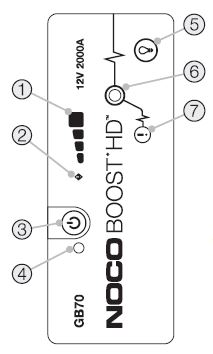
- Internal Battery Level Indicates the charge level of the internal battery.
- Error LED Illuminates Red if reverse polarity is detected, or blinks “On” and “Off” when the internal battery temperature is too high.
- Power Button Push to turn unit "On" & "Off".
- Power LED Illuminates White when unit is "On".
- Light Mode Button Toggles the ultra-bright LED light through 7 light modes: 100% > 50% > 10% > SOS > Blink > Strobe > Off
- Boost LED Illuminates White when Boost is active. If the unit is connected properly to a battery, the GB70 will automatically detect a battery and go into Boost mode (LED flashes White when Manual Overide feature is active).
- Manual Override Button To enable, push and hold for three (3) seconds. WARNING: Disables safety protection and manually forces Boost "On". Only for use when a battery is too low to be detected.
Troubleshooting the GB70 Error
- Error LED: Solid red, means reserve polarity, please reserve the battery connection
- Error LED: Blinking red with cables connected properly, the internal battery is too hot, you can allow the unit to cool. Bring the unit into cooler environment
- Boost light does not come on with cables connected properly, its mean connected battery is below 2-volts, please remove all loads and try again, or use manual override mode
Technical Specifications
| Internal battery: | Lithium Ion |
| Peak current rating: | 2000A |
| Operating temperature: | -30°C to +50°C |
| Charging temperature: | 0ºC to +40ºC |
| Storage temperature: | -20ºC to +50ºC (Avg Temp.) |
| Micro USB (Input): | 5V, 2.1A |
| USB (Output): | 5V, 2.1A |
| 12V (input) | 12V, 3A |
| 12V (output) | 12V, 15A |
| Housing Protection: | IP65 (w/Ports Closed) |
| Cooling: | Natural Convection |
| Dimensions (L x W x H): | 6.7 x 3.2 x 1.7 Inches |
| Housing Protection: | IP65 |
| Cooling: | Natural Convection |
| Dimensions (L x W x H): | 8.6 x 6 x 2.5 Inches |
| Weight: | 5 Pounds |
Frequently Asked Questions
How many jump starts can GB70 perform on a full charge?
Up to 40 jump starts per full charge.
How long does charging take?
Approximately 14 hours for a full charge.
Is GB70 waterproof?
It’s splash resistant and rated IP65, but not submersible.
Can I jump-start a diesel engine?
Yes — up to 6.0L diesel engines are supported.
Please read the instruction before using the Noco Genius HD GB70 2000A lithium jump starter. Detailed instruction can be found in Noco Genius HD GB70 User Guide that you can download PDF file or read the user manual online in the link provided above
A user guide or instructions were not included and would be VERY helpful. Not even a note about how to look on internet. I would like a set of instructions if possible.