View or download Zunmos IM001 Ice Maker Instruction manual. Find guide about how to use the ice maker, troubleshooting guide, and technical parameter.
Table of Content
- Important Safety Information
- Product Introduction
- Before using the ice maker
- How to use Zunmos ice maker
- Troubleshooting
- Technical Parameter
Download Zunmos IM001 Countertop Ice Maker Instruction Manual
.jpg)
| Brand | Zunmos |
| Model | IM001 |
| Category |
Ice Maker |
| File Size | 4.59 MB |
| Pages | 11 Pages |
| Language | English |
| 225 views | |
Control Panel
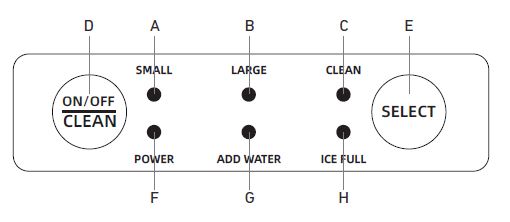
- Small ice indicator
- Large ice indicator
- Clean indicator
- ON/OFF button
- Select button
- Power indicator
- Add water indicator
- Ice full indicator
How to User Zunmos Ice Maker
When using an ice maker for the first time or after it hasn't been used for a while, it's recommended to discard the ice cubes made in the first few cycles (usually the first 3-4). This helps to ensure that any dust, debris, or residual manufacturing oils are cleared out of the machine and that the ice cubes produced are clean and safe for consumption.
- Open the front cover, remove the ice basket, and fill the water tank with potable water without exceeding the MAX mark.
- Put the ice basket back, ensure the water level is below the bottom of the basket, and close the front cover.
- After plugging in, the appliance enters standby mode, with the power indicator flashing green and the small ice indicator lit steadily in green.
- Press the ON/OFF button once to start the appliance in small ice cube mode by default, and the small ice indicator will remain steady green.
- During the ice-making cycle, press the Select button to switch to large ice cube mode, and the large ice cube indicator will light up. The appliance has a power-off memory function, so it will automatically resume the last used ice cube mode (large or small) after being powered on.
- In standby mode, press and hold the ON/OFF button for 5 seconds to enter self-cleaning mode, and the clean indicator will turn red. After 15 minutes, the self-cleaning mode ends, the appliance switches back to standby mode, and the power indicator flashes.
Troubleshooting
If the machine breaks down, wait for it to stop automatically. You can troubleshoot using the methods in the instruction manual file, but do not disassemble, inspect, or repair the machine without professional guidance.
This machine has a self-checking function. If an error occurs, the ice-full and add-water indicators will blink alternately, and the ice maker will stop working.