About Silonn SLIM06 Ice Maker User Manuals
The Silonn SLIM06 Ice Maker is a top-of-the-line appliance that produces high-quality ice in a matter of minutes. With its sleek design and easy-to-use interface, the SLIM06 is the perfect addition to any kitchen or bar. To ensure that you get the most out of your ice maker, it’s important to have access to the comprehensive user manual.
The Silonn SLIM06 Ice Maker User Manual provides detailed instructions on installation, maintenance, and troubleshooting, so you can keep your ice maker running smoothly. With helpful tips and step-by-step guides, the manual is an essential resource for anyone who wants to get the most out of their Silonn SLIM06 Ice Maker.
Safety Instructions
To reduce the risk of fire, explosion, electric shock, or injury when using your ice maker, follow the important safety instruction in these manuals, such as:
- Check that the voltage power corresponds to the one shown on the appliance nameplate before using the ice maker
- Don't remove any safety, warning, or product information labels from your ise maker
- Plug the ice maker into a grounded power outlet. No other appliance should be plugged into the same outlet. Be sure that the plug is fully inserted into the receptacle.
- Avoid using an extension cord because it may overheat and cause a risk of fire.
Silonn SLIM06 Parts
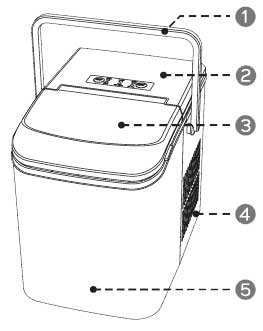
- Handle
- Top lid
- Front cover
- Back housing
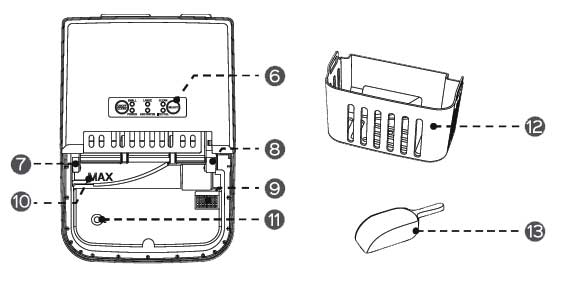
- Front housing
- Control panel
- Infrared light-emitting diode
- Infrared light-reveiving diode
- Filter
- "MAX" water level
- Drain plug
- Ice basket
- Ice spoon
Silonn SLIM06 Ice Maker Control Panel
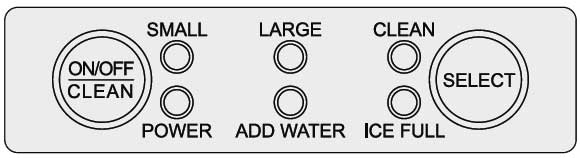
| Key (With indicator | Function |
| ON/OFF/CLEAN | Start or stop the ice maker |
| in the standby mode, press and hold the "ON/OFF/CLEAN" button for 5 seconds, the ice maker will enter self-cleaning mode, and the clean indicator turns red. | |
| POWER |
Standby mode: "POWER" indicator blinks |
| ICE FULL | ICE FULL indicator lights up when the ice basket is full |
| ADD WATER | ADD WATER indicator lights up when the water reservoir is lacking of water |
| SMALL | The indicator lights up when small ice is selected |
| LARGE | The indicator lights up when larege ice is selected |
| CLEAN | CLEAN indicator lights up when the ice maker is cleaning itself |
| SELECT | Confirming large ice mode or small ice mode |
How to Use Silonn Ice Maker SLIM06
Before First Use
- Before connecting the power cord, please put the ice maker upright for 24 hours to allow the refrigerant to settle. Unpact the ice maker, then check and make sure all the accessories including ice basket and ice scoop, are included.
- Please follow the steps as mentions in these user manual to install the handle in position
- Please ensure the ice maker is level and on a stable table or platform to avoid malfunction
- The incline angle of the ice maker cabinet should not exceed 45 degree during transportation or use. Don't turn the ice maker upside down. Doing so could cause the compressor or refrigerating system to operate incorectly. Please allow time for the fluids in the compressor to settle after the ice maker is moved or transported.
- The ice maker must be placed on a dry and level surface with sufficient ventilation, far from heat sources such as ovens, heaters and corrosive gases. leave about a 6-inch (15cm) clearance on all sides of the ice maker for proper ventilation
- Don't fill the water reservoir with hot water. This may damage the ice maker. it is best to fill the water reservoir with water of room temperature or lower.
- Don't use the appliance in very cold environment (lower than 5 celcius)
- Clean the appliance by following the operation of Cleaning and maintenance before operating.
Using Ice Maker
When using for the first time (or not used for a long time), it is recommended to discard the ice cubes made in the first 4 cyclces to ensure that the machine is thoroughly cleaned. Operate the ice maker in an environtment with an ambient temperature between 10°C and 32°C, it is recommended to put the first production ice cubes into the water tank. To make the ice more uniform
- Insert the ince maker's main plug into a main socket.
- Open the front cover, take out the ice basket, and pour potable water into the water tank (don't exceed the MAX level mark)
- Put back the ice basket. Make sure the water level is below the bottom of the ice basket, and then close the front cover.
- After plugging in, the appliance is in standby mode with the power indicator flashing green and the small ice indicator stable in green.
- Press the ON/OFF button once, the ice maker will start working in small ice cube mode by default, and the small ice indicator will be stable in green color.
- During the ice making cycle, press the SELECT button to swithc to the large ice cube mode.
- During the ice making cycle, press the ON/OFF button once, the ice maker will stop working and the power indicator flashes green.
- In the standby mode, press and hold ON/OFF button for 5 seconds to enter self-cleaning mode and the clean indicator turns red. After 15 minutes, the Ice maker swithces to standby mode, and power indicator flashes.
Tips using Silonn SLIM06 Ice Maker
When the ice container is full, the "ICE FULL" indicator on the display panel will light up (red), and the machine will stop automaticcally. When the ice is removed, the machine will continue working.
If water is insufficient, the ADD WATER idicator lights up (red) and the ice maker will stop working, After refilling, press the ON/OFF button to continue.
When you are not use the ice maker, please turn off the ice maker and unplug the power cord.
Cleaning and Maintenance of Silonn Ice Maker SLIM06
To keep your ice tasting fresh and your ice maker looking great, we recommend cleaning your ice maker once per week.
- Stop the ice-making cycle by pressing the ON/OFF/CLEAN button, wait five minutes and unplug.
- If residual water is found in the ice tray, gently push the ice tray back so that all water drains into the water reservoir.
- Move the appliance forward to a place 60mm away from the working table and open the drain plug to drain out excess water
- Check and make sure the drain plug must be closed well. Full the water reservoir with clean water. In the standby mode, press ON/OFF/CLEAN button until the clean indicator lights up, the pump will start to pump water and keep running for 15 minutes, the appliance siwthces to standby mode, and the power indicator flashes. Finally, open the drain plug and empty the water.
- Remove the ice basket. Wash the ice basket and ice scoop in warm soapy water. Rinse and dry
- Clean the ice maker interior with a soft cloth soaked with warm water and vinegar, then rinse with clean water and then drain all the water. Slot the drain plug in position.
- Clean the exterior of the ice maker with a soft damp cloth. Use a mild dishwashing soap, if necessary.
Spesifications of Silonn Ice Maker SLIM06
| Model | SLIM06 |
| SKU | SLIM06B SLIM06W SLIM06B1 SLIM06G1 |
| Protection Type | I |
| Rated Current | 1.8A |
| Water Reservoir | 1.5L |
| Ice Basket Capacity | 1.1Lbs(0.5kg) |
| Ice Making Rate | 22 lbs per day |
| Ice Shape | Bullet |
| Ice Size | Small or large |
| Power Source | 110-120V/60Hz |
| Rated Power | 105W |
| Refrigerant/amount | R600a/0.99oz |
| Foaming Agent | C5H10 |
| Net Weight | 7KG |
| Material | ABS, PP |
| Unit Size (D*W*H) | 225x320x295(mm) |
Troubleshooting the Silonn Ice Maker SLIM06
Add Water Indicator Turns on
Possible cause is low water level or lack of water, the water screen at the bottom of the water reservoir is blocked or pump malfunction. The solution is stop making ice, refill water and then press the ON/OFF button to restart ice making, or try to start self cleaning.
ICE FULL indicator light up
Possible causes ice basket is full and the infrared light is blocked by the ice, Infrared light-emiting diode & light-receiving diode do not work
- Remove the ice from the ice basket
- Wipe up the foreign objects on the infrared light-emiting diode & light receiving diode and restart the ice maker
The ice accumulates together
Making ice too much time, the water in the water reservoir is too low temperature
- Stop making ice and restart the ice-making cycle after the ice melts
- Fill the water reservoir with water ranges between 8°C and 25°C
The ice-making cycle seems normal but no ice is produced
Possible causes :
- Water pump is damaged, need to replace the parts
- The ambient temperature or water temperature is too high
- Refrigerating system leaks
- Refrigerating system blocks
Poor ice-making result
Possible causes:
- Poor heat dissipation, leave a 6-inch clearance on all sides
- The water temperature is too high, fill the water reservoir with cold water
- The ambient temperature is too high
Fan does not work or produces noise
- Fan and ice maker are damaged, need to replace with new parts
- Ice maker temperature is too high
Water pump does not work or produces noise
- Water pump is damaged, need to replace with new parts
- The Ice maker has not been cleaned for a long time.
Download Silonn SLIM06 Ice Maker User Manuals

| Brand | Silonn |
| Model | SLIM06 |
| Category |
Ice Maker |
| File Size | 2.8 Mb |
| Pages | 15 Pages |
| Language | English |
| 1788 views | |
Download Silonn Ice Maker SLIM06 User Manual
These Instruction Manual compatible with Silonn Ice Maker SLIM06B SLIM06W SLIM06B1 and SLIM06G1. Download your copy today and start enjoying perfectly chilled drinks in no time!
Need instructions
Manual