Table of Contents
Introduction
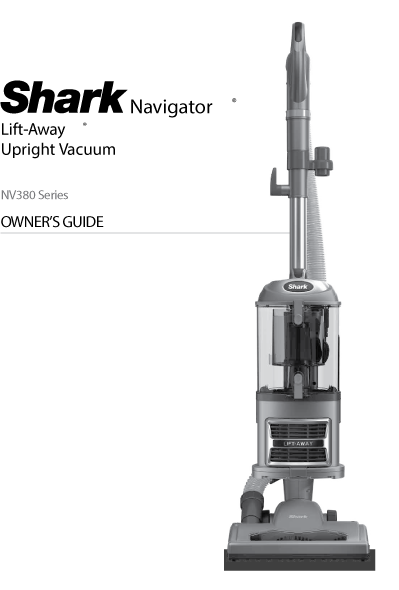
Welcome to the Shark Navigator Lift-Away Vacuum Owner's Guide. This guide will provide you with all the information you need to get the most out of your new vacuum cleaner. Please read this guide carefully before using your vacuum for the first time.
Download Shark NV380 Navigator Lift-Away Vacuum Owner's Guide
| Brand | Shark |
| Model | NV380 |
| Category |
Vacuum Cleaner |
| File Size | 2.9 MB |
| Pages | 9 Pages |
| Language | English |
| 964 views | |
Getting Started
What's in the Box
- Vacuum Body
- Motorized Floor Nozzle
- Handle & Hose
- Wand
- Pet Power Brush
- Dusting Brush
- Crevice Tool
Assembling Your Vacuum
- Insert the wand into the motorized floor nozzle.
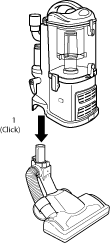
- Insert the handle into the wand.
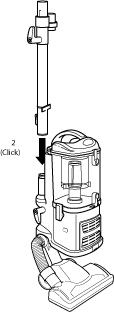
- Attach Accessory holder into wand
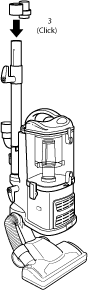
- Insert The handle into wand
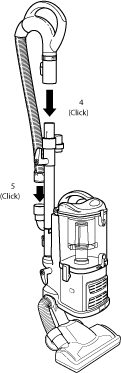
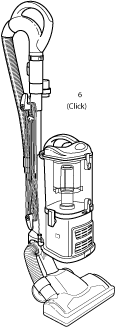
- Connect the hose to the back of the vacuum body.
- Store the accessories on the accessory holder.
How to Use Your Vacuum
Upright Cleaning
For cleaning carpets and hard floors, use the vacuum in its upright mode. Press the power button to start the vacuum. For carpets, select the "Brush Roll On" setting. For hard floors, select the "Brush Roll Off" setting.
Lift-Away Cleaning
For cleaning stairs, furniture, and other above-floor areas, use the vacuum in its Lift-Away mode. Press the "Lift-Away" button to detach the canister from the floor nozzle. You can then carry the canister and use the handle and hose with the accessories to clean various surfaces.
Maintenance
Emptying the Dust Cup
Empty the dust cup after every use. To do this, press the dust cup release button and lift the dust cup off the vacuum. Hold the dust cup over a trash can and press the bottom release button to empty the contents.
Cleaning the Filters
Clean the pre-motor filters every 3 months and the post-motor filter once a year. To clean the pre-motor filters, remove the dust cup and take out the foam and felt filters. Rinse them with water and let them air dry completely before putting them back. To clean the post-motor filter, remove the filter cover on the front of the vacuum and take out the filter. Rinse it with water and let it air dry completely before putting it back.
Warning: Do not operate the vacuum without the filters in place. Do not use soap to clean the filters. Let the filters air dry completely before reinstalling.
Troubleshooting
Troubleshooting most common problem in Shark NV380 series Navigator Lift-away vacuum cleaner
Vacuum Not Picking Up Dirt
- Check if the dust cup is full and empty it.
- Ensure the filters are clean and properly installed.
- Check for blockages in the hose, wand, or floor nozzle.
- Make sure the brush roll is spinning (if applicable).
Brush Roll Not Spinning
- Ensure the vacuum is in the "Brush Roll On" setting.
- Check for blockages or tangled hair around the brush roll.
- Make sure the floor nozzle is properly connected to the wand.
Vacuum Shuts Off
- The vacuum may have overheated. Turn it off and let it cool for at least 45 minutes.
- Check for blockages in the hose, wand, or floor nozzle.
- Ensure the dust cup is empty and filters are clean.
Frequently Asked Questions (FAQs)
Tip: Register your Shark vacuum on their official website to receive product updates and warranty information.